Telegram Bot Payments with Stars (XTR): Paid Actions Playbook
If a creator already has a Telegram audience, a bot can turn that audience into paid actions: a report, a file, a credit pack, a private command, a mini-service, or a media-related unlock.
The awkward part is not the button. It is the handoff. The buyer needs enough Stars, the bot needs a clean invoice, and the paid action should unlock only after Telegram confirms the payment.
This playbook is for creators and operators planning a bot-delivered paid action with Telegram Stars. If your readers are still new to the balance itself, start with what Telegram Stars are. If buyers need Stars before launch, send them to top up Telegram Stars before the bot prompt goes live.
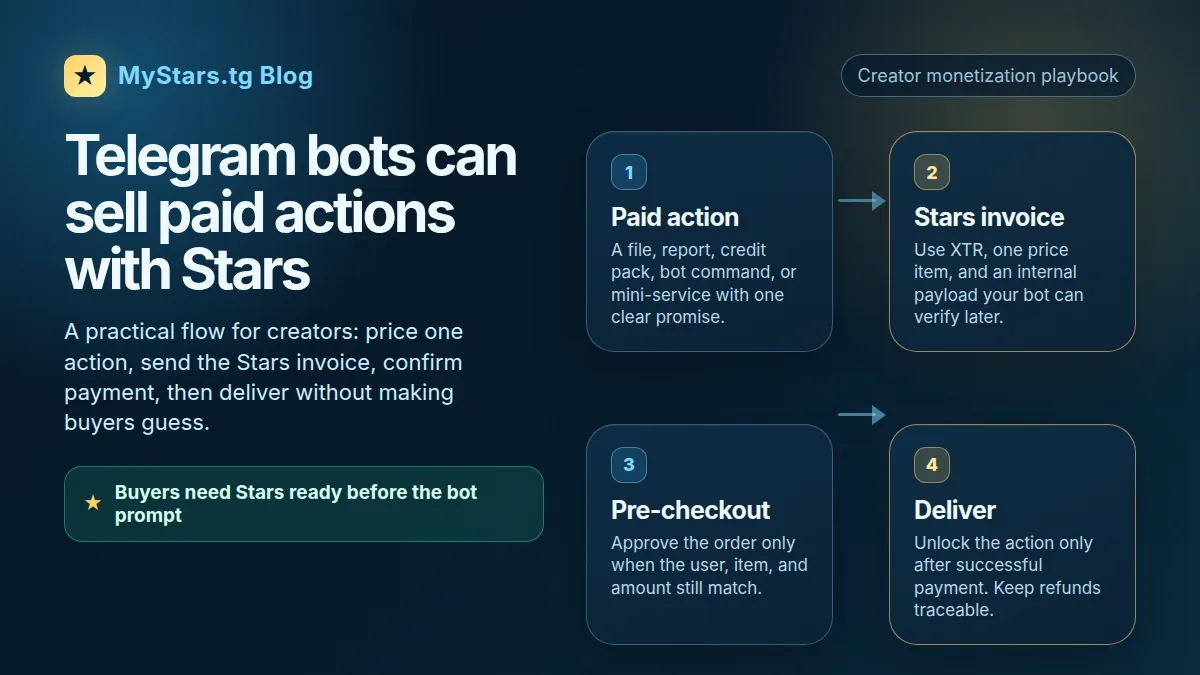
Quick answer
A Telegram bot paid action works best when you keep the offer small and verifiable.
Use this flow:
- Define one paid action.
- Show the buyer what they will get.
- Send a Stars invoice for that action.
- Check the pre-checkout request before accepting the payment.
- Deliver only after a successful payment event.
- Store the payment reference so support and refunds are not guesswork.
- Tell buyers how to get Stars before the unlock moment.
Telegram's Stars payment docs describe the basic invoice sequence for digital goods and services: sendInvoice, pre_checkout_query, answerPreCheckoutQuery, successful_payment, then delivery. The Bot API uses XTR as the Stars currency tag for these payments.
That is the technical spine. The creator job is simpler: make the paid action clear enough that the buyer knows why they are spending Stars.
What this playbook covers
Use this playbook for bot-delivered paid actions such as:
- unlocking a downloadable file;
- generating a private report;
- adding credits to a bot account;
- opening a paid command;
- delivering a custom checklist, prompt pack, chart, or template;
- giving access to a one-time service handled by a bot.
Do not mix those with every Telegram Stars flow.
Paid media is for paid photos, videos, and supported media unlocks. If your product is a media drop, read the Telegram paid media buyer guide and the guide on how to price paid Telegram media with Stars.
Star Subscriptions gate access to a channel through a paid invite link with a monthly fee. Mini apps can also use Stars, but the buyer flow is different. If that is the case, use the guide on how to pay for Telegram mini apps with Stars.
If you need the broader map first, start with how to monetize Telegram content with Stars.
Step 1: define the paid action
Do not start with the invoice. Start with the thing the buyer gets.
Weak paid-action promises sound like this:
- "Premium access."
- "Unlock more."
- "Support the bot."
- "Get extra content."
Those lines create support questions because the buyer cannot tell what changes after payment.
A stronger paid-action promise is specific:
- "Generate one private audit report."
- "Unlock the full PDF template pack."
- "Add 50 credits to your bot balance."
- "Run the advanced chart command once."
- "Open the private checklist for this lesson."
Before pricing anything, write one sentence:
After paying, the buyer gets ________.
If the sentence is vague, the bot flow will feel vague too.
Step 2: send the Stars invoice
For a standard bot invoice, Telegram's Bot API method is sendInvoice. For Stars payments, the invoice uses the Stars currency tag XTR.
A practical invoice checklist:
- use
currencyasXTR; - keep the provider token empty for Stars payments where Telegram docs allow it;
- use one price item for a Stars payment;
- put your internal order reference in the payload;
- keep the title and description short enough that the buyer can recognize the action;
- do not reuse the same payload for unrelated actions.
The payload matters because the payment screen is not your whole order system. Your bot still needs to know which user, action, and price this invoice belongs to.
Good internal payload data usually includes:
- buyer user ID;
- paid action ID;
- expected Stars amount;
- order timestamp;
- nonce or unique order ID;
- status such as
created,pending,paid,delivered, orrefunded.
Keep the public invoice copy human. The buyer should not see internal IDs or developer wording.
Bad invoice title:
SKU_XTR_CMD_ADV_2026
Better invoice title:
Advanced chart report
Bad invoice description:
Execute paid action after callback validation.
Better invoice description:
Unlock one private chart report from this bot.
Step 3: handle pre-checkout like a guardrail
Telegram sends a pre-checkout query before the payment is completed. Treat this as a final safety check, not a formality.
Before approving, confirm that:
- the user still matches the order;
- the paid action still exists;
- the expected Stars amount still matches;
- the action is still available;
- the order has not already been paid or cancelled;
- the payload has not expired.
If something does not match, reject the pre-checkout query with a clear error message. Do not let a stale invoice unlock the wrong action.
This is especially important for bots that sell limited items, timed access, or generated outputs. A user may tap an old invoice link after the offer changed. Your bot should know what to do.
Step 4: deliver only after success
A button tap is not payment. A pre-checkout approval is not delivery. Deliver after Telegram sends the successful payment event.
A clean delivery flow looks like this:
- Receive
successful_payment. - Match it to the internal order.
- Store the Telegram payment charge ID.
- Mark the order as paid.
- Deliver the paid action.
- Mark the order as delivered.
- Send a short confirmation message to the buyer.
If the paid action is instant, such as a file or credit pack, delivery can happen immediately after confirmation. If it requires processing, tell the buyer what is happening and what to expect next.
Keep support practical. If you store the order ID, paid action, Stars amount, payment charge ID, and delivery status, you can answer most support questions without digging through chat history.
Step 5: make buyer top-up timing obvious
The buyer side is easy to forget. Creators usually test the bot while they already have Stars. Real buyers may arrive with an empty balance.
Telegram's Stars payment docs say users can acquire Stars if necessary before paying for digital goods and services. That does not mean the extra step is frictionless for every buyer. If your paid action launches at a specific time, warn the audience early.
A simple launch message can say:
The bot will unlock the paid report with Telegram Stars. If you do not have enough Stars yet, top up before launch so you are not doing it during checkout.
This is where MyStars fits naturally. The creator does not need to move the buyer out of Telegram for the paid action itself. They only need buyers to have Stars ready before the unlock moment. Send buyers to top up Telegram Stars before the drop, not after they are already frustrated.
If you also run paid media drops, use the paid media launch plan for scheduling teasers, buyer reminders, and post-launch measurement.
Decision branches
If the paid value is a file or template
Keep the payment one-time. Deliver the file after successful payment, then send a short receipt-style message.
Do not make the buyer ask an admin for the file manually. That turns a bot flow into a support queue.
If the paid value is a generated report
Tell the buyer whether the report is instant or queued.
If generation can fail, separate payment confirmation from delivery status:
paid, generating;paid, delivered;paid, failed - support needed.
That makes refunds and support easier.
If the paid value is credits
Add credits only after successful payment. Show the new balance immediately.
If credits expire, say so before checkout. Hidden expiry rules create complaints.
If the paid value is media
Use the right flow. A bot invoice can sell a digital good or service, but paid media has its own Bot API method and product behavior. If you are selling a photo/video/media unlock, compare the flow with the Telegram paid media buyer guide before you build.
If the paid value is channel access
That may be a Star Subscription or another access flow, not a one-time bot action. Keep monthly access, one-time paid actions, and paid media separate in your copy.
Mistakes to avoid
- Selling a vague
premiumpromise without saying what unlocks. - Treating a button tap as payment.
- Delivering after pre-checkout instead of after successful payment.
- Forgetting to store the Telegram payment charge ID.
- Reusing one payload format for unrelated actions.
- Letting old invoice links unlock changed offers.
- Hiding expiry or usage limits until after payment.
- Using developer labels in buyer-facing invoice copy.
- Sending buyers to top up only after the launch has already started.
- Calling every Stars flow
paid posts, which can confuse paid media, subscriptions, bot invoices, and text-only channel content.
Troubleshooting
Buyer says they paid, but the bot did not unlock
Likely causes:
- the bot did not receive or process
successful_payment; - the internal order ID did not match the payload;
- delivery failed after payment;
- the bot marked the order paid but not delivered.
Fix:
- search by user ID and order ID;
- check the stored payment charge ID;
- verify the paid action status;
- deliver manually if payment succeeded and the item is valid;
- log the failure so the same bug does not repeat.
Buyer cannot pay because they do not have Stars
Likely cause:
- the buyer reached the payment moment without enough Stars ready.
Fix:
- add a pre-launch reminder;
- include a
top up Telegram Starslink in the launch instructions; - keep the bot's payment message short and clear;
- do not bury top-up guidance inside a long announcement.
Pre-checkout fails
Likely causes:
- the order expired;
- the payload is malformed;
- the expected amount changed;
- the paid action is no longer available;
- the bot already processed the order.
Fix:
- return a clear error message;
- let the user create a fresh invoice;
- avoid silently failing with no explanation.
Refund or support request arrives
Likely causes:
- the buyer paid for the wrong action;
- delivery failed;
- the offer copy was unclear;
- the buyer expected a subscription or media unlock, but bought a bot action.
Fix:
- check the payment charge ID and delivery log;
- decide whether a refund is appropriate under your policy and Telegram's available methods;
- rewrite the offer if multiple buyers misunderstand the same point.
FAQ
Can a Telegram bot accept Stars for a paid action?
Yes, Telegram's Stars payment docs cover digital goods and services sold through bots and mini apps. For a bot invoice, the important pieces are the Stars currency tag XTR, pre-checkout handling, successful payment confirmation, and delivery after payment.
What does XTR mean?
XTR is the currency tag Telegram uses for Stars in the Bot API payment flow. Use it for Stars invoices instead of treating Stars like a normal fiat currency code.
Do Stars invoices need a payment provider token?
Telegram's Bot API docs say to pass an empty provider token for payments in Telegram Stars where that parameter appears. Check the current Bot API docs before implementation because API details can change.
When should the bot deliver the action?
After the successful payment event, not after the user taps the pay button and not merely after pre-checkout approval.
What if the buyer does not have enough Stars?
Warn buyers before launch. They can prepare their balance first, then unlock inside Telegram when the bot invoice appears. If they need more Stars, send them to top up Telegram Stars.
Is a bot paid action the same as paid media?
No. Paid media is for paid photos, videos, and supported media unlocks. A bot paid action can be a file, report, credit pack, command, or service delivered by the bot. Keep the flow and copy separate.
Can Stars payments be refunded?
Telegram's Bot API includes refundStarPayment for successful Stars payments. Store the payment charge ID and your internal order status so you can handle support and refund decisions cleanly.
Sources and evidence
- Telegram Stars launch: Telegram Stars: Pay for Digital Goods and More.
- Stars payment flow for bots: Telegram Stars Payments.
- Bot invoice parameters: Bot API sendInvoice.
- Paid media scope: Bot API sendPaidMedia.
- Star Subscriptions and paid media announcement: Telegram Super Channels, Star Reactions and Subscriptions.
- Stars terms and balance scope: Telegram Stars Terms.
Final checklist
Before you launch a bot paid action:
- the paid action is specific;
- the invoice title is human-readable;
- the payload maps to one internal order;
- the Stars amount is checked before payment;
- delivery happens after successful payment;
- support can find the charge ID and delivery status;
- buyers know how to top up Stars before the bot prompt.