Telegram Live Stream Run Sheet: Host a Useful Channel Event
A Telegram live stream should not feel like a random group call with a title. It needs a run sheet: the topic, the host role, the guest role, the audience prompts, the follow-up links, and the one thing listeners should do after it ends.
Use this playbook when you want to turn a channel audience into an active event room without overproducing it. It works for operator Q&As, product walkthroughs, community office hours, paid photo/video previews, bot demos, mini app walkthroughs, and educational sessions before a release.
Telegram supports live streams in groups and channels with unlimited viewers. That gives small channel teams and niche operators a practical event format without moving the audience to another platform.
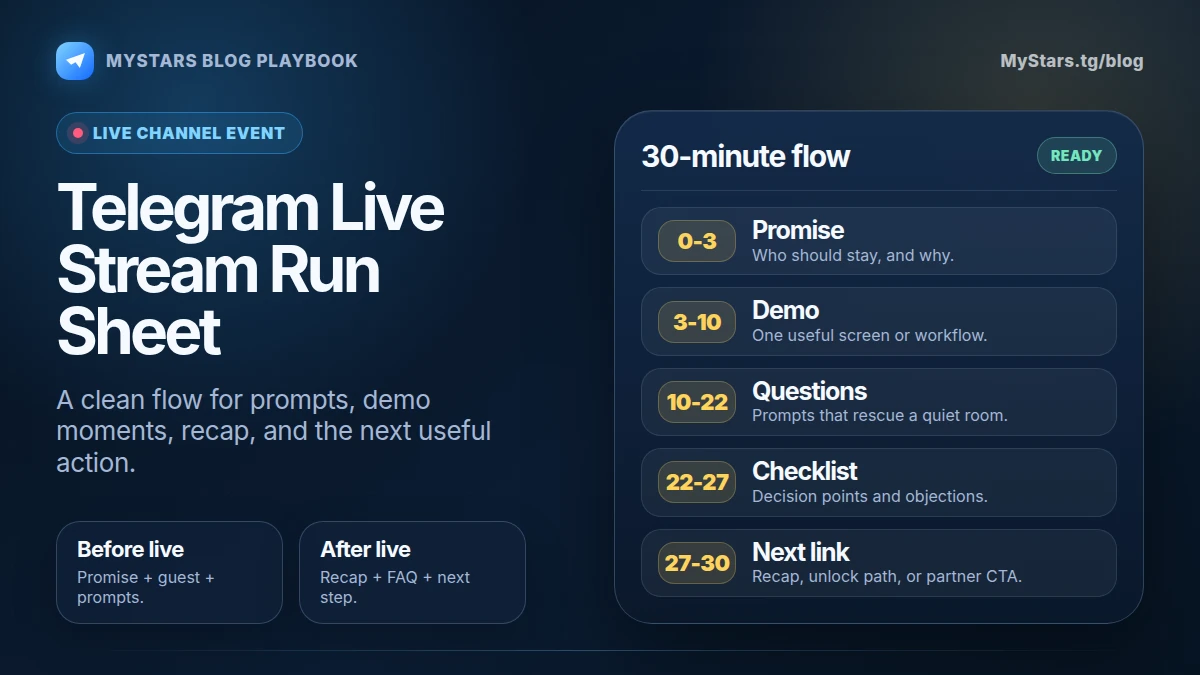
The run sheet at a glance
Create one page before you schedule the event:
- Event promise: what the listener will understand or decide by the end.
- Audience: who should attend and who should skip it.
- Host notes: opening, transitions, questions, close.
- Guest notes: what the guest must prove or show.
- Live prompts: questions, polls, examples, screenshots, or demos.
- Follow-up: links, recap post, replay note, next action.
- Safety notes: topics you will not discuss and claims you will not make.
This page keeps the session useful when the chat gets noisy, the guest wanders, or the audience asks the same question five different ways.
1. Pick one event promise
A weak event promise sounds like this:
We will talk about Telegram growth.
A useful promise sounds like this:
In 30 minutes, you will know whether a live Q&A, bot demo, or paid photo/video preview is the right next event for your channel.
The second promise gives the listener a decision. That is what makes the event worth attending.
Use this format:
By the end, attendees will be able to [specific action or decision].
Examples:
- By the end, channel owners can choose the right format for their first Telegram live session.
- By the end, bot builders can explain their first-use flow in one demo.
- By the end, channel owners can turn live questions into three follow-up posts.
Keep the promise narrow. A focused event gets better questions and cleaner follow-up content.
2. Choose the event type
Pick one type before you write the announcement.
Office hours
Best when your audience already has questions. Use it for support, feedback, pricing confusion, wallet questions, or workflow problems.
Demo session
Best when people need to see a bot, mini app, paid photo/video flow, or checkout step. Keep the demo short. Show the important screens, then let questions drive the rest.
Expert interview
Best when trust comes from the guest’s experience. Give the guest three prompts in advance so they do not turn the session into a biography.
Release room
Best when you are about to publish a paid unlock, partnership, course, bot feature, or community offer. Do not spend the whole stream selling. Use it to explain who it is for, what it solves, and what to do next.
If the session supports a bigger publishing plan, connect it to your editorial rhythm. The Telegram content calendar playbook can help you place the event between teaser posts, proof posts, and follow-up posts without making the channel feel repetitive.
3. Write the announcement like a filter
The announcement should attract the right people and quietly repel the wrong ones.
Include:
- topic;
- date and time with timezone;
- who should attend;
- what will be shown or answered;
- how to submit questions;
- whether there will be a replay or recap;
- the next step after the stream.
Example:
Live session: turn Telegram channel questions into a cleaner content plan. For channel owners who already publish weekly and want better reader signals. Bring one confusing audience question. We will turn examples into post ideas and a follow-up checklist.
That kind of announcement sets expectations. It also gives you material for the run sheet.
4. Prepare five anchor questions
Do not rely on the audience to carry the event. Prepare five questions that can rescue the stream if the chat is quiet.
Good anchor questions:
- What decision is the viewer trying to make today?
- What proof would make this topic easier to trust?
- What part of the workflow feels unclear?
- What would stop someone from taking the next step?
- What should we turn into a follow-up post?
If your channel uses comments or discussion chats, collect questions before the stream. The Telegram audience work playbook is useful here: segment the questions by reader type instead of treating every comment as equal.
5. Keep the live structure simple
A 30-minute structure works for most channel events:
- 0:00 to 3:00: promise, agenda, who this is for.
- 3:00 to 10:00: one example, demo, or problem walkthrough.
- 10:00 to 22:00: audience questions or guest answers.
- 22:00 to 27:00: decision checklist.
- 27:00 to 30:00: recap and next step.
Do not overfill the middle. Live sessions feel useful when listeners can hear their own problem inside the discussion.
If you have a guest, give them the structure before the event. Good guests still need boundaries.
6. Decide the follow-up before going live
The follow-up is where most channels waste the event.
Prepare at least one of these before the stream starts:
- recap post;
- checklist post;
- FAQ post;
- replay note;
- partner link;
- bot or mini app link;
- paid photo/video preview link;
- support note for common questions.
After the stream, publish the recap quickly while the questions are still fresh. Link to the next useful page or post. If the event produced several good questions, turn them into a short series instead of one overloaded recap.
For partner events, use the Telegram collaboration playbook to plan the shared asset and repost path. A live stream becomes stronger when both sides know what they will publish afterward.
7. Add a payment-readiness note only when needed
Most live streams do not need a payment reminder. Keep the event focused on value.
Add a short payment-readiness note only if the event leads into a supported Stars action:
- paid photo or video;
- bot digital good or service;
- mini app item;
- gift;
- subscription or member access where Stars are part of the flow.
Good wording:
If you plan to unlock the paid photo or video after the stream, top up Stars before the drop opens so you are not doing it in a rush.
Bad wording:
Buy Stars now because something paid might happen later.
Be specific. The reader should know why they need Stars and what they will unlock.
If the event introduces a paid photo or video, send readers to the guide for Stars-paid unlocks. If you are still designing the business side, use how to monetize Telegram content with Stars before you announce the paid step.
Buy Telegram Stars with crypto
Planning a Telegram event that leads to a Stars-paid unlock? Top up Stars with MyStars before the moment goes live.
Buy Stars NowMistakes to avoid
Do not announce a live stream before you know the promise. "We will chat" is not enough.
Do not make the guest responsible for structure. The host owns the room.
Do not let the stream end without a recap path. If people learned something, give them a link they can save or forward.
Do not turn every live event into a sales pitch. Trust comes from useful answers first.
Do not use payment language unless the next step is a real supported paid format.
FAQ
How long should a Telegram live stream be?
For most channel events, 25 to 40 minutes is enough. Go longer only when the audience is actively asking useful questions.
Should I invite a guest?
Invite a guest when they add proof, examples, or a second point of view. Do not invite a guest just to make the event look bigger.
What should I post after the stream?
Post a short recap, the strongest question, one practical checklist, and the next link. If there were many questions, split the follow-up into two or three posts.
Where do Stars fit?
Stars fit after the value is clear and the next step is supported: paid photos or videos, bot digital goods, mini app items, gifts, or subscriptions. The live stream should explain the value before asking anyone to top up.
Sources and evidence
- Telegram’s Live Streams update introduced live streams with unlimited viewers for groups and channels.
- Telegram’s Live Streaming with other apps update describes broadcasting to groups and channels from tools like OBS Studio and XSplit.
- Telegram’s API notes for paid photos and videos describe content unlocked with Stars.
- Telegram’s Stars announcement explains Stars for digital goods and services in bots and mini apps.