Telegram Stories सीक्वेंस चेकलिस्ट: Hook, Context, Route
Telegram Story के पास next tap कमाने के लिए बहुत कम समय होता है। इसलिए किसी channel Story को छोटे poster जैसा नहीं लगना चाहिए। उसे छोटी sequence चाहिए: एक frame viewer को रोकने के लिए, एक frame context देने के लिए, और एक frame उसे किसी काम की destination तक route करने के लिए।
यह checklist channel owners को Telegram Stories के लिए repeatable तीन-frame structure देती है। इसे नई guide, live session, collaboration reminder, poll result, product note या छोटी announcement के लिए use करें, जब goal किसी specific link तक ले जाना हो।
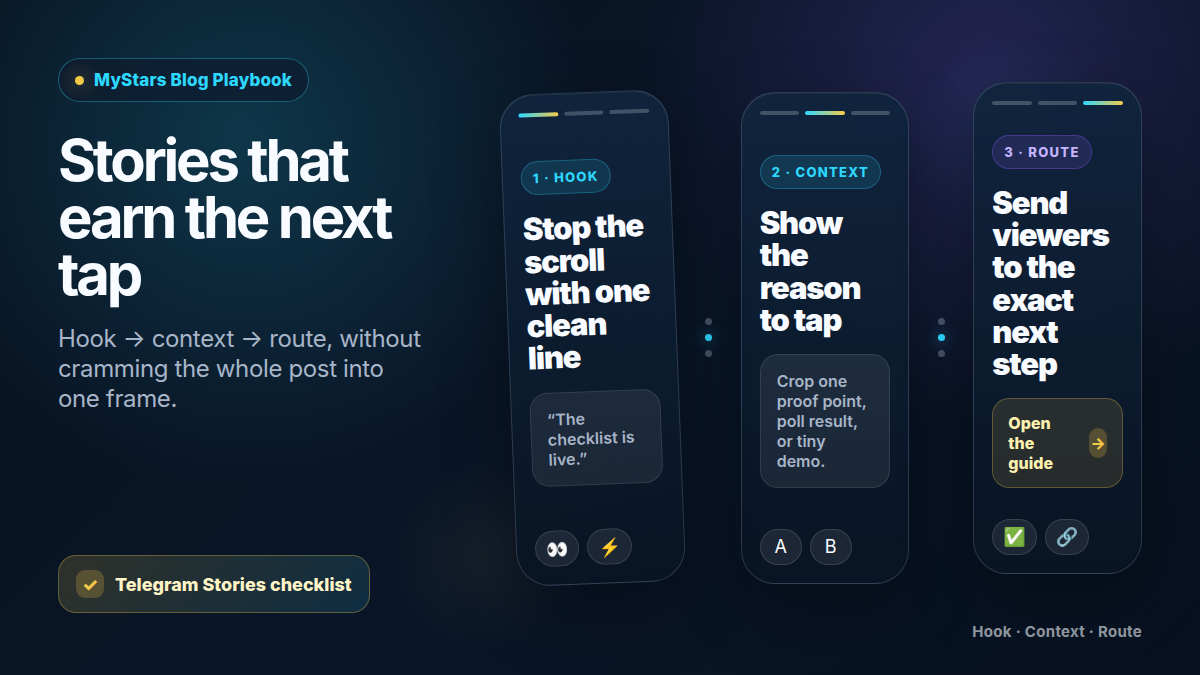
तीन-frame sequence
जब Story का काम curiosity से action तक ले जाना हो, यह order use करें।
Frame 1: Hook
पहला frame यह जवाब दे: "मुझे आगे क्यों देखना चाहिए?"
अच्छे hooks छोटे होते हैं:
- "आज रात के setup में एक गलती।"
- "Checklist live है।"
- "अगला teardown चुनें।"
- "Live session से पहले 3 जवाब।"
- "नई guide: पहले यह पढ़ें।"
लंबी headline stacks से बचें। अगर viewer को दस सेकंड तक पढ़ना पड़े, तो frame post का काम कर रहा है।
Frame 2: Context
दूसरा frame route को समझ में लाने लायक context देता है।
काम का context यह हो सकता है:
- checklist का crop किया हुआ item;
- before/after example;
- poll result;
- छोटा quote;
- screenshot जिसमें एक area highlight हो;
- countdown;
- एक objection का जवाब;
- छोटा demo step.
इस frame में पूरे article का summary न डालें। इसका काम destination को खोलने लायक महसूस कराना है।
Frame 3: Route
Final frame यह जवाब दे: "अब मुझे क्या करना चाहिए?"
Route को specific रखें:
- "Pinned guide खोलें।"
- "Full post पढ़ें।"
- "Reaction sticker से vote करें।"
- "18:00 UTC पर live join करें।"
- "Tool खोलें और step 1 try करें।"
- "Deadline से पहले इसे save करें।"
"हमारा channel check करें" जैसा vague route कमजोर है। Viewer को exact destination पर भेजें।
Frames के बाद caption लिखें
Caption को image repeat नहीं करनी चाहिए। इसे उन details के लिए use करें जो visual में बहुत छोटी पड़ती हैं:
- Story किसके लिए है;
- पूरी explanation कहाँ है;
- last update के बाद क्या बदला;
- deadline किस time zone में है;
- link खोलने से पहले viewer को क्या prepare करना चाहिए.
अच्छा caption आम तौर पर दो short lines का होता है। उसे route explain करना चाहिए, frame से compete नहीं।
Reaction stickers तभी use करें जब आप उन पर act करेंगे
Reaction stickers decoration नहीं हैं। जब answer आपके next action को बदलता है, तब वे छोटा research tool बनते हैं।
इन्हें ऐसे choices के लिए use करें:
- short version या full breakdown;
- beginner example या advanced teardown;
- live Q&A या written guide;
- template, checklist या case study;
- yes, no या "पहले दिखाइए".
Story expire होने के बाद loop close करें। Result post करें या next Story में mention करें। अगर लोग vote करते हैं और कुछ नहीं बदलता, वे दोबारा vote न करना सीखते हैं।
Stories को मौजूदा channel assets से जोड़ें
Stories तब सबसे बेहतर काम करती हैं जब वे ऐसे system की ओर point करें जिसे आप पहले से maintain करते हैं।
इन्हें हल्के route की तरह use करें:
- आपकी Telegram content calendar से planned article या post;
- आपके creator collaboration workflow से partner announcement;
- आपकी Telegram live stream run sheet से reminder;
- आपकी Telegram giveaway funnel checklist से post-campaign follow-up.
Story doorway है। Destination story भेजने से पहले ready होना चाहिए।
MyStars cue सिर्फ checkout distance पर जोड़ें
अधिकतर Stories को checkout line की जरूरत नहीं होती। MyStars cue तभी जोड़ें जब viewer checkout या balance-prep step के करीब हो।
Buy Telegram Stars with crypto
Checkout से पहले balance ready चाहिए? MyStars पर crypto से top up करें।
Buy Stars Nowअगर Story सिर्फ awareness या education के लिए है, checkout cue छोड़ दें और route clean रखें।
Mobile design checks
Publish करने से पहले Story को phone-sized screen पर preview करें।
Check करें:
- main text एक glance में readable है;
- key line Telegram UI के नीचे नहीं दबी;
- image cluttered screenshot नहीं है;
- link या route instruction obvious है;
- हर frame same visual system use करता है;
- final frame में एक action है, तीन नहीं;
- caption essential context छिपा नहीं रहा.
अगर Story पढ़ने में कठिन है, font छोटा करने से पहले copy काटें।
बचने वाली गलतियाँ
- Story को full article screenshot बना देना.
- तीनों frames में वही बात कहना.
- Follow-up plan के बिना reactions माँगना.
- Viewers को exact destination के बजाय generic channel page पर भेजना.
- Deadline image में रखना, लेकिन time zone नहीं.
- Viewer समझे उससे पहले payment cue जोड़ना.
- Pretty Story को unfinished post की ओर point करने देना.
Telegram Stories checklist
Story live होने से पहले confirm करें:
- Frame 1 छोटा hook देता है.
- Frame 2 एक useful context point देता है.
- Frame 3 एक route देता है.
- Caption route explain करता है.
- हर link exact destination पर जाता है.
- Reaction stickers के लिए follow-up plan है.
- Text mobile पर readable है.
- MyStars cue केवल checkout step के पास दिखता है.
- Traffic आने से पहले destination ready है.
FAQ
क्या channel Story को पूरी post दोहरानी चाहिए?
नहीं। Story का काम next tap को उपयोगी महसूस कराना है। पूरी explanation destination में रखें।
क्या एक Story काफी है?
कभी-कभी। लेकिन promotion के लिए तीन frames अक्सर बेहतर काम करते हैं: hook, context, route. अधिक frames तभी जोड़ें जब हर frame का अलग काम हो।
मुझे क्या measure करना चाहिए?
अगला action track करें: replies, reactions, link taps, post views, starts या attendance. केवल Story views से यह नहीं पता चलता कि route काम किया या नहीं।
MyStars कब mention करना चाहिए?
सिर्फ तब, जब route checkout step तक ले जाता हो और viewer को balance ready चाहिए हो। अगर Story सिर्फ topic को warm up कर रही है, इंतजार करें।
क्या यह live content के लिए काम करेगा?
हाँ। एक frame topic के लिए, एक question या proof point के लिए, और एक time और route के लिए use करें। पूरा live plan अलग रखें।
स्रोत और प्रमाण
- Telegram Stories launch और story features: Stories and 10 Years of Telegram.
- Telegram channel story posting, boosts, reaction stickers और channel story counters: Stories in Channels, View-Once Media and More.
- Boosts से Stories unlock करने वाले channels और groups के लिए Telegram Live Stories context: Live Stories, Repeated Messages, Auctions for Gifts and More.
- Balance ready रखने वाले readers के लिए MyStars top-up path: MyStars.