Telegram ऐप और बॉट के लिए Fragment API SDK गाइड
ज़्यादातर Telegram commerce विचार prototype के बाद एक ही बाधा से टकराते हैं: bot या Mini App बनाना आसान होता है, लेकिन Stars और Premium fulfilment के लिए अब भी भरोसेमंद backend flow चाहिए। इसी कारण developers Fragment API खोजते हैं।
MyStars FaaS वह आवश्यक परत प्रदान करता है। FaaS का अर्थ Fragment as a Service है: आपका Telegram product उपयोगकर्ता अनुभव और ऑर्डर database अपने पास रखता है, जबकि MyStars API, आधिकारिक SDK और signed status updates के माध्यम से fulfilment workflow उपलब्ध कराता है।
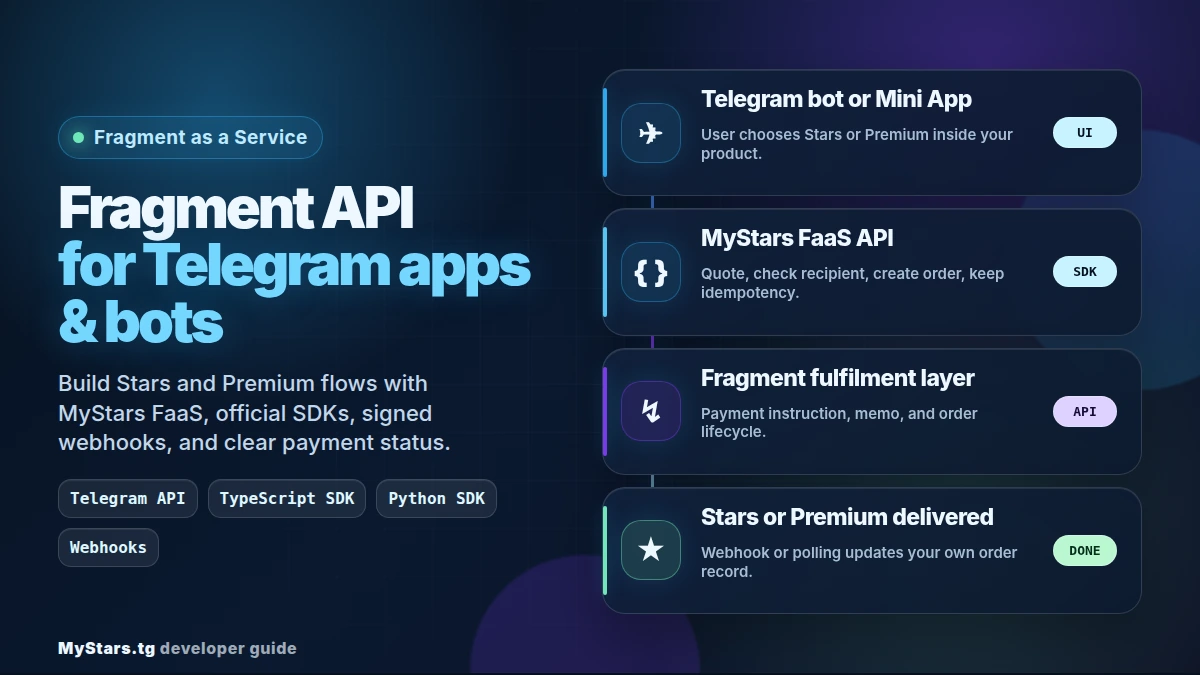
इस गाइड का उपयोग तब करें जब आप केवल एक और API overview पढ़ना नहीं, बल्कि वास्तविक Telegram app, bot, marketplace, creator tool या reseller flow को जोड़ना चाहते हैं।
स्पष्ट आर्किटेक्चर: सामने Telegram API, उसके पीछे Fragment API
सीमा को सरल रखें।
आपकी Telegram API layer उन हिस्सों को संभालती है जिन्हें उपयोगकर्ता देख सकते हैं: bot commands, inline keyboards, Mini App screens, order cards, messages और support replies।
आपकी server layer आपकी business logic संभालती है: local orders, margin, fraud rules, admin controls, database writes और support evidence।
MyStars FaaS layer Fragment as a Service workflow संभालती है: pricing, recipient checks, order creation, payment instructions और fulfilment status।
यह अलगाव सुरक्षा के लिए महत्वपूर्ण है। MyStars API key को Telegram Mini App frontend में न रखें। client को केवल आपके backend से और backend को MyStars से संवाद करना चाहिए।
अपने stack के लिए SDK इंस्टॉल करें
Node.js और TypeScript backends के लिए आधिकारिक @mystars-tg/faas-sdk का उपयोग करें:
npm install @mystars-tg/faas-sdk
Python backends के लिए आधिकारिक mystars-faas package का उपयोग करें:
pip install mystars-faas
दोनों पैकेज आधिकारिक MyStars FaaS SDK के रूप में प्रकाशित हैं और डेवलपर्स को interactive API documentation की ओर निर्देशित करते हैं। मौजूदा package docs में FaaS API v1.9.0 के साथ संगतता बताई गई है, जो API reference के साथ SDK examples जाँचते समय उपयोगी है।
TypeScript में पहला backend route बनाएँ
पहले route को सब कुछ करने की कोशिश नहीं करनी चाहिए। अपने local order ID से एक fulfilment order बनाने के लिए server-only action से शुरू करें, जो कोट लाए और recipient जाँचे।
कोड से पहले, इसका सरल भाषा में काम यह है:
MYSTARS_API_KEYका उपयोग करके backend पर MyStars client बनाता है;- चुनी हुई Stars मात्रा की मौजूदा कीमत MyStars से पूछता है;
- जाँचता है कि Telegram username उत्पाद प्राप्त कर सकता है या नहीं;
- recipient पात्र न हो तो खराब ऑर्डर बनाने के बजाय वहीं रुक जाता है;
- अपने स्थायी
localOrderIdको idempotency के आधार के रूप में इस्तेमाल कर fulfilment order बनाता है; - कोट और MyStars order object लौटाता है ताकि आपका app उन्हें store कर सके और payment instruction दिखा सके।
import { MyStarsClient } from "@mystars-tg/faas-sdk";

const client = MyStarsClient.production(process.env.MYSTARS_API_KEY!);

export async function createStarsOrder(input: {
  username: string;
  quantity: number;
  localOrderId: string;
}) {
  const quote = await client.getPricing({
    type: "stars",
    quantity: input.quantity,
    payment_currency: "ton",
  });

  const recipient = await client.checkRecipient({
    type: "stars",
    recipient: { username: input.username },
  });

  if (!recipient.eligible) {
    return { ok: false, message: recipient.telegram_message };
  }

  const order = await client.createOrder(
    {
      type: "stars",
      recipient: { username: input.username },
      quantity: input.quantity,
      payment_currency: "ton",
      callback_url: "https://your-app.example.com/webhooks/mystars",
    },
    { idempotencyKey: `local-${input.localOrderId}` },
  );

  return { ok: true, quote, order };
}
सबसे महत्वपूर्ण भाग idempotency key है। अपने सिस्टम से मिलने वाली स्थिर वैल्यू का उपयोग करें। यदि सर्वर-साइड ऑर्डर बनने के बाद HTTP request timeout हो जाए, तो duplicate बनाने के बजाय उसी key के साथ फिर प्रयास करें।
कुछ पंक्तियों पर विशेष ध्यान दें:
MyStarsClient.production(...)का अर्थ है कि request live MyStars API पर जा रही है; वास्तविक traffic के लिए तैयार होने तक अपने सिस्टम में test/local order उपयोग करें।getPricing(...)आपके backend को मौजूदा कोट देता है। bot UI में कीमतें hardcode न करें।payment_currency: "ton"इस SDK example में मूल payment route के लिए API enum/name है। अपने product UI में इस route को Gram या Gram (ex. TON) लिखें। ब्लॉकचेन/नेटवर्क के नाम के लिए TON रखें।checkRecipient(...)खरीदार को ऐसे username या product के लिए भुगतान करने से बचाता है जिसका fulfilment नहीं हो सकता।callback_urlवह स्थान है जहाँ MyStars ऑर्डर बनने के बाद status updates भेज सकता है।idempotencyKeyduplicate-order guard है। इसे आपके database order से आना चाहिए, browser में randomly generated value से नहीं।
async Python में वही flow बनाएँ
Python teams को सामान्यतः async code चाहिए क्योंकि उनका Telegram bot framework पहले से async होता है। Python SDK इसे सीधे समर्थित करता है।
यह example TypeScript route जैसा ही काम करता है, लेकिन Python में:
- request की अवधि के लिए async MyStars client खोलता है;
usdt_tonमें Premium quote माँगता है;- order creation से पहले recipient जाँचता है;
- recipient को Premium न मिल सकने पर सुरक्षित error message लौटाता है;
- status updates के लिए callback URL के साथ order बनाता है;
- quote और order लौटाता है ताकि आपका bot उन्हें store करे और उपयोगकर्ता को अगला चरण दिखाए।
from mystars_faas import AsyncMyStarsClient

async def create_premium_order(username: str, months: int, local_order_id: str):
    async with AsyncMyStarsClient.production(MYSTARS_API_KEY) as client:
        quote = await client.get_pricing(
            type="premium",
            months=months,
            payment_currency="usdt_ton",
        )

        recipient = await client.check_recipient(username, type="premium")
        if not recipient.eligible:
            return {"ok": False, "message": recipient.telegram_message}

        order = await client.create_order(
            type="premium",
            recipient=username,
            months=months,
            payment_currency="usdt_ton",
            callback_url="https://your-app.example.com/webhooks/mystars",
            idempotency_key=f"local-{local_order_id}",
        )

        return {"ok": True, "quote": quote, "order": order}
इसे production में ले जाते समय सटीक धन-प्रबंधन अपनाएँ, API key को environment variable में रखें और लौटाई गई payment instruction को ठीक वैसा ही store करें। यदि instruction में memo/comment हो, तो उसे बदल सकने वाली copy नहीं बल्कि data मानें।
कम अनुभवी developer के लिए मुख्य बात यह है: यह code example पूर्ण bot नहीं है। यह वह backend हिस्सा है जिसे आपका bot तब call करता है जब उपयोगकर्ता पहले ही product चुन चुका होता है। इस function के आसपास Telegram bot को अपने handlers, buttons, database writes और user messages की अब भी आवश्यकता है।
लॉन्च से पहले webhook verification जोड़ें
Fragment API-जैसा integration order creation के काम करने पर पूरा नहीं होता। आपके app को भरोसेमंद status path भी चाहिए।
न्यूनतम webhook handler:
- raw request body प्राप्त करें।
X-Faas-Signatureheader पढ़ें।- अपने webhook secret से signature verify करें।
- MyStars order ID और status के आधार पर dedupe करें।
- local order को केवल तभी update करें जब transition valid हो।
- अपने Telegram bot या Mini App के ज़रिए उपयोगकर्ता को सूचित करें।
TypeScript SDK में constructEvent, Express middleware और Fastify support जैसे webhook helpers दर्ज हैं। Python SDK में WebhookVerifier तथा सामान्य Python web frameworks के लिए integrations शामिल हैं।
backup के तौर पर polling या reconcile job रखें। webhooks तेज़ रास्ता हैं; reconciliation तब मदद करता है जब सुबह 3 बजे कोई network edge case आ जाए।
blueprint bot को कार्यशील संदर्भ की तरह इस्तेमाल करें
जब आप सभी चलते हुए हिस्सों को एक साथ देखना चाहते हैं, तो MyStars Python blueprint bot सबसे अच्छा स्रोत है। यह fulfilment के लिए mystars-faas==0.1.3, health checks और MyStars webhooks के लिए aiohttp server, state के लिए Postgres और Redis, on-chain payments के लिए TON Center monitoring, तथा margin और reconciliation के लिए admin commands इस्तेमाल करता है।
blueprint को brand template न मानें। इसे engineering map मानें:
- local order कहाँ बनाना है;
- recipient checks कहाँ call करने हैं;
- margin कहाँ लागू करना है;
- payment कहाँ monitor करना है;
- fulfilment कहाँ call करना है;
- terminal status के बाद Telegram order card कहाँ edit करना है।
MyStars GitHub account SDK repositories भी प्रकाशित करता है, इसलिए README से अधिक गहराई में debug करने पर आप source, examples और package structure देख सकते हैं।
अपने app में बनाने वाले backend endpoints
छोटा production-grade integration आम तौर पर इन routes से शुरू होता है:
POST /api/faas/quote
POST /api/faas/recipient-check
POST /api/orders
POST /webhooks/mystars
GET  /api/orders/:id
POST /api/admin/reconcile
Telegram bot या Mini App को MyStars को सीधे नहीं, बल्कि आपके अपने /api/orders route को call करना चाहिए। फिर आपका route उपयोगकर्ता को validate कर सकता है, local order बना सकता है, SDK call कर सकता है, लौटे हुए fulfilment order को store कर सकता है और client की ज़रूरत के केवल सुरक्षित fields वापस भेज सकता है।
वे भुगतान विवरण जिनका उपयोगकर्ताओं को अनुमान नहीं लगाना चाहिए
यदि आपका product payment screen दिखाता है, तो सटीक रहें। MyStars flows के लिए USDT का अर्थ USDT on TON है। अन्य USDT networks एक-दूसरे के बदले इस्तेमाल नहीं किए जा सकते। मूल मार्ग के लिए मौजूदा API examples अब भी payment_currency: "ton" उपयोग कर सकते हैं; खरीदार-केंद्रित copy में टोकन के लिए Gram / GRAM (ex. TON) और नेटवर्क के लिए TON का उपयोग होना चाहिए।
payment timeout को hardcode करने के बजाय order का expires_at field पढ़ें। docs में बताया गया है कि payment window को 1 hour तक बढ़ाया गया था और expires_at प्रामाणिक स्रोत बना रहता है।
वास्तविक traffic से पहले क्या test करें
उपयोगकर्ताओं को flow में भेजने से पहले ये जाँच चलाएँ:
- एक Stars order और एक Premium order;
- एक ineligible recipient path;
- उसी idempotency key के साथ order creation को फिर से चलाना;
- valid और invalid webhook signatures;
- duplicated webhook event delivery;
- expired order handling;
- support evidence: username, local order ID, MyStars order ID, payment hash, memo/comment और status;
- margin, reconcile, refund, broadcast और manual fulfilment commands के लिए केवल admin access।
यह आकर्षक हिस्सा नहीं है, लेकिन यही Telegram Stars bot को प्रयोगात्मक के बजाय भरोसेमंद बनाता है।
FAQ
क्या यह direct public Fragment API है?
MyStars FaaS, Fragment as a Service layer है। आपका app MyStars APIs और SDKs के साथ integrate करता है, जबकि MyStars उस interface के पीछे fulfilment workflow संभालता है।
क्या मैं इसे Telegram Mini App से इस्तेमाल कर सकता हूँ?
हाँ। API key अपने backend पर रखें। Mini App को आपके server को और server को MyStars FaaS को call करना चाहिए।
मुझे किस package से शुरू करना चाहिए?
Node.js और TypeScript के लिए @mystars-tg/faas-sdk इस्तेमाल करें। Python और async Telegram bots के लिए mystars-faas इस्तेमाल करें।
क्या मुझे blueprint bot चाहिए?
नहीं, लेकिन payments, admin commands, reconciliation और status updates वाले reseller-style bot के लिए यह उपयोगी है।
सबसे सुरक्षित पहला milestone क्या है?
एक end-to-end test बनाएँ: quote → recipient check → local order → MyStars order → verified webhook या polling update। इसके काम करने के बाद margin, refund policy, admin tools और support workflows जोड़ें।
API reference, SDK links और मौजूदा contract notes के लिए MyStars docs से शुरू करें।