دليل Fragment API SDK لتطبيقات وبوتات Telegram
تصل معظم أفكار التجارة على Telegram إلى العقبة نفسها بعد النموذج الأولي: من السهل بناء البوت أو Mini App، لكن تنفيذ Stars وPremium ما زال يحتاج إلى مسار خلفي موثوق. لهذا يبحث المطورون عن Fragment API.
يوفر MyStars FaaS هذه الطبقة المفقودة. وتعني FaaS Fragment as a Service: يحتفظ منتجك على Telegram بتجربة المستخدم وقاعدة بيانات الطلبات، بينما يقدّم MyStars مسار التنفيذ عبر API وSDKs رسمية وتحديثات حالة موقّعة.
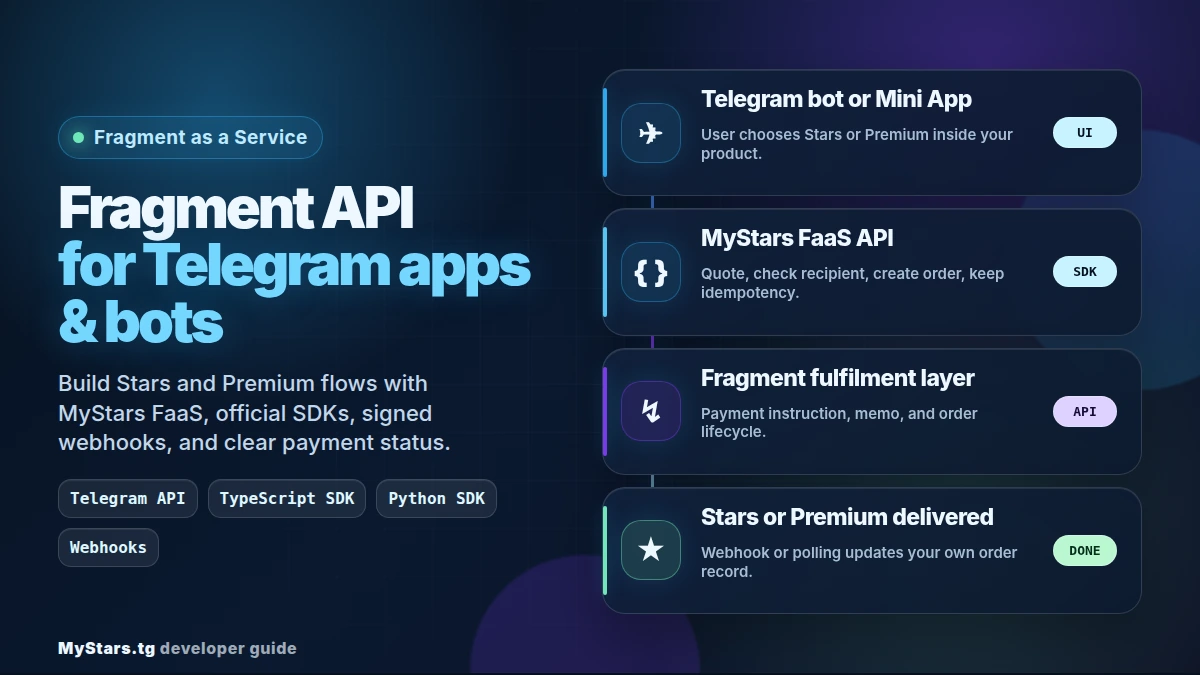
استخدم هذا الدليل عندما تريد توصيل تطبيق Telegram حقيقي أو بوت أو سوق أو أداة للمبدعين أو مسارًا لتاجر إعادة بيع، لا عندما تريد قراءة نظرة عامة أخرى عن API فقط.
البنية الواضحة: Telegram API في الواجهة وFragment API خلفها
اجعل الحدود بسيطة.
تتعامل طبقة Telegram API مع الأجزاء التي يراها المستخدمون: أوامر البوت، ولوحات المفاتيح المضمنة، وشاشات Mini App، وبطاقات الطلبات، والرسائل، وردود الدعم.
تمتلك طبقة الخادم منطق أعمالك: الطلبات المحلية، والهامش، وقواعد الاحتيال، وعناصر تحكم المشرف، وعمليات الكتابة إلى قاعدة البيانات، وأدلة الدعم.
تتعامل طبقة MyStars FaaS مع مسار Fragment as a Service: التسعير، والتحقق من المستلم، وإنشاء الطلبات، وتعليمات الدفع، وحالة التنفيذ.
هذا الفصل مهم للأمان. لا تضع مفتاح MyStars API في الواجهة الأمامية لـ Telegram Mini App. ينبغي أن يتحدث العميل إلى خادمك، وأن يتحدث خادمك إلى MyStars.
ثبّت SDK المناسبة لحزمتك التقنية
لواجهات Node.js وTypeScript الخلفية، استخدم @mystars-tg/faas-sdk الرسمية:
npm install @mystars-tg/faas-sdk
لواجهات Python الخلفية، استخدم حزمة mystars-faas الرسمية:
pip install mystars-faas
تُنشر كلتا الحزمتين بوصفهما SDKs رسمية لـ MyStars FaaS وتوجهان البنّائين إلى توثيق API التفاعلي. وتصف وثائق الحزمة الحالية التوافق مع FaaS API v1.9.0، وهو أمر مفيد عند مقارنة أمثلة SDK بمرجع API.
أنشئ أول مسار خلفي في TypeScript
لا ينبغي أن يحاول المسار الأول تنفيذ كل شيء. ابدأ بإجراء يعمل على الخادم فقط، يطلب عرض سعر ويتحقق من المستلم وينشئ طلب تنفيذ واحدًا انطلاقًا من معرّف طلبك المحلي.
قبل الكود، إليك وصفًا واضحًا لما يفعله:
- ينشئ عميل MyStars في الواجهة الخلفية باستخدام
MYSTARS_API_KEY؛ - يطلب من MyStars السعر الحالي لكمية Stars المختارة؛
- يتحقق مما إذا كان اسم مستخدم Telegram قادرًا على تلقي المنتج؛
- يتوقف مبكرًا إذا لم يكن المستلم مؤهلًا، بدل إنشاء طلب خاطئ؛
- ينشئ طلب التنفيذ باستخدام
localOrderIdالثابت الخاص بك أساسًا لمبدأ عدم التكرار؛ - يعيد عرض السعر وكائن طلب MyStars حتى يخزنه تطبيقك ويعرض تعليمات الدفع.
import { MyStarsClient } from "@mystars-tg/faas-sdk";

const client = MyStarsClient.production(process.env.MYSTARS_API_KEY!);

export async function createStarsOrder(input: {
  username: string;
  quantity: number;
  localOrderId: string;
}) {
  const quote = await client.getPricing({
    type: "stars",
    quantity: input.quantity,
    payment_currency: "ton",
  });

  const recipient = await client.checkRecipient({
    type: "stars",
    recipient: { username: input.username },
  });

  if (!recipient.eligible) {
    return { ok: false, message: recipient.telegram_message };
  }

  const order = await client.createOrder(
    {
      type: "stars",
      recipient: { username: input.username },
      quantity: input.quantity,
      payment_currency: "ton",
      callback_url: "https://your-app.example.com/webhooks/mystars",
    },
    { idempotencyKey: `local-${input.localOrderId}` },
  );

  return { ok: true, quote, order };
}
الجزء المهم هو مفتاح عدم التكرار. استخدم قيمة ثابتة من نظامك. إذا انتهت مهلة طلب HTTP بعد إنشاء الطلب على الخادم، فأعد المحاولة بالمفتاح نفسه بدل إنشاء طلب مكرر.
هناك أسطر تستحق اهتمامًا إضافيًا:
MyStarsClient.production(...)يعني أن الطلب يذهب إلى MyStars API المباشر، لذا استخدم طلبًا اختباريًا/محليًا في نظامك إلى أن تصبح جاهزًا للحركة الحقيقية.- يمنح
getPricing(...)واجهتك الخلفية عرض سعر حاليًا. لا تضع أسعارًا ثابتة في واجهة البوت. payment_currency: "ton"هي قيمة التعداد/الاسم في API لمسار الدفع الأصلي في مثال SDK هذا. في واجهة منتجك، سمِّ هذا المسار Gram أو Gram (ex. TON). واحتفظ باسم TON لسلسلة الكتل/الشبكة.- يحمي
checkRecipient(...)المشتري من الدفع مقابل اسم مستخدم أو منتج لا يمكن تنفيذه. callback_urlهو المكان الذي يمكن أن يرسل إليه MyStars تحديثات حالة الطلب بعد إنشائه.idempotencyKeyهو حاجز الطلبات المكررة. يجب أن يأتي من طلب في قاعدة بياناتك، لا من قيمة عشوائية ينشئها المتصفح.
أنشئ المسار نفسه في Python غير المتزامن
تحتاج فرق Python عادةً إلى كود غير متزامن لأن إطار بوت Telegram لديهم يعمل بطريقة غير متزامنة أصلًا. وتدعم Python SDK ذلك مباشرةً.
ينفذ هذا المثال المهمة نفسها التي ينفذها مسار TypeScript، لكن بلغة Python:
- يفتح عميل MyStars غير متزامن طوال مدة الطلب؛
- يطلب عرض سعر لـ Premium بعملة
usdt_ton؛ - يتحقق من المستلم قبل إنشاء الطلب؛
- يعيد رسالة خطأ آمنة إذا تعذر على المستلم تلقي Premium؛
- ينشئ الطلب مع URL لرد النداء لتحديثات الحالة؛
- يعيد عرض السعر والطلب حتى يخزنهما البوت ويعرض الخطوة التالية للمستخدم.
from mystars_faas import AsyncMyStarsClient

async def create_premium_order(username: str, months: int, local_order_id: str):
    async with AsyncMyStarsClient.production(MYSTARS_API_KEY) as client:
        quote = await client.get_pricing(
            type="premium",
            months=months,
            payment_currency="usdt_ton",
        )

        recipient = await client.check_recipient(username, type="premium")
        if not recipient.eligible:
            return {"ok": False, "message": recipient.telegram_message}

        order = await client.create_order(
            type="premium",
            recipient=username,
            months=months,
            payment_currency="usdt_ton",
            callback_url="https://your-app.example.com/webhooks/mystars",
            idempotency_key=f"local-{local_order_id}",
        )

        return {"ok": True, "quote": quote, "order": order}
عند نقل هذا إلى بيئة الإنتاج، استخدم معالجة دقيقة للأموال، واحفظ مفتاح API في متغير بيئة، وخزّن تعليمات الدفع كما أعادها النظام تمامًا. وإذا تضمنت التعليمات مذكرة/تعليقًا، فعاملها باعتبارها بيانات لا نصًا يمكنك إعادة صياغته.
بالنسبة إلى المطور الأقل خبرة، الفكرة الأساسية هي: مثال الكود ليس بوتًا كاملًا. إنه الجزء الخلفي الذي يستدعيه بوتك عندما يكون المستخدم قد اختار المنتج بالفعل. وما زال بوت Telegram يحتاج إلى معالجاته وأزراره وعمليات الكتابة إلى قاعدة البيانات ورسائل المستخدم حول هذه الدالة.
أضف التحقق من webhook قبل الإطلاق
لا يكتمل تكامل بأسلوب Fragment API عندما ينجح إنشاء الطلب. يحتاج تطبيقك أيضًا إلى مسار حالة موثوق.
الحد الأدنى لمعالج webhook:
- استقبل نص الطلب الخام.
- اقرأ رأس
X-Faas-Signature. - تحقق من التوقيع باستخدام سر webhook الخاص بك.
- أزل التكرار بحسب معرّف طلب MyStars والحالة.
- حدّث طلبك المحلي فقط إذا كان الانتقال صالحًا.
- أبلغ المستخدم عبر بوت Telegram أو Mini App.
توثق TypeScript SDK مساعدات webhook مثل constructEvent وExpress middleware ودعم Fastify. وتتضمن Python SDK WebhookVerifier وتكاملات مع أطر الويب الشائعة في Python.
احتفظ بمهمة استطلاع أو مصالحة كنسخة احتياطية. فـ Webhooks هي المسار السريع؛ أما المصالحة فهي ما ينقذك عندما تظهر حالة حدّية للشبكة عند الساعة 3 صباحًا.
استخدم blueprint bot كمرجع عملي
يُعد Python blueprint bot من MyStars أفضل مصدر عندما تريد رؤية الأجزاء المتحركة مجتمعة. فهو يستخدم mystars-faas==0.1.3 للتنفيذ، وخادم aiohttp لفحوصات الصحة وwebhooks الخاصة بـ MyStars، وPostgres وRedis للحالة، ومراقبة TON Center للمدفوعات على السلسلة، وأوامر المشرف للهامش والمصالحة.
لا تتعامل مع blueprint بوصفه قالبًا للعلامة التجارية. تعامل معه بوصفه خريطة هندسية:
- موضع إنشاء الطلب المحلي؛
- موضع استدعاء فحوصات المستلم؛
- موضع تطبيق الهامش؛
- موضع مراقبة الدفع؛
- موضع استدعاء التنفيذ؛
- موضع تعديل بطاقة طلب Telegram بعد حالة نهائية.
ينشر حساب MyStars على GitHub أيضًا مستودعات SDK، لذا يمكنك فحص المصدر والأمثلة وبنية الحزمة عندما تحتاج إلى تصحيح أعمق من README.
نقاط النهاية الخلفية التي ينبغي أن تنشئها في تطبيقك
يبدأ التكامل الصغير الجاهز للإنتاج عادةً بهذه المسارات:
POST /api/faas/quote
POST /api/faas/recipient-check
POST /api/orders
POST /webhooks/mystars
GET  /api/orders/:id
POST /api/admin/reconcile
ينبغي أن يستدعي بوت Telegram أو Mini App مسار /api/orders الخاص بك، لا MyStars مباشرة. ويمكن لمسارك بعد ذلك التحقق من المستخدم وإنشاء طلب محلي واستدعاء SDK وتخزين طلب التنفيذ المعاد، ثم إعادة الحقول الآمنة التي يحتاجها العميل فقط.
تفاصيل الدفع التي يجب ألا يخمّنها المستخدمون
إذا كان منتجك يعرض شاشة دفع، فكن دقيقًا. في تدفقات MyStars، يعني USDT قيمة USDT على TON. ولا يمكن استبدال شبكات USDT الأخرى بها. أما في المسار الأصلي، فلا تزال أمثلة API الحالية تستخدم payment_currency: "ton"؛ وينبغي أن تستخدم النسخة الموجهة للمشتري Gram / GRAM (ex. TON) للرمز وTON للشبكة.
اقرأ حقل expires_at في الطلب بدل وضع مهلة للدفع في الكود. تشير الوثائق إلى أن نافذة الدفع مُددت إلى 1 ساعة، ويبقى expires_at مصدر الحقيقة.
ما الذي تختبره قبل الحركة الحقيقية
نفّذ هذه الفحوصات قبل إدخال المستخدمين إلى المسار:
- طلب Stars واحد وطلب Premium واحد؛
- مسار مستلم غير مؤهل واحد؛
- إعادة محاولة إنشاء الطلب بمفتاح عدم التكرار نفسه؛
- توقيعات webhook صحيحة وغير صحيحة؛
- تسليم حدث webhook مكرر؛
- معالجة طلب منتهي الصلاحية؛
- دليل الدعم: اسم المستخدم، ومعرّف الطلب المحلي، ومعرّف طلب MyStars، وهاش الدفع، والمذكرة/التعليق، والحالة؛
- وصول مخصص للمشرف فقط لأوامر الهامش والمصالحة والاسترداد والبث والتنفيذ اليدوي.
هذا هو الجزء غير البراق، لكنه ما يجعل بوت Telegram Stars موثوقًا بدلًا من أن يبدو تجريبيًا.
الأسئلة الشائعة
هل هذه Fragment API عامة ومباشرة؟
MyStars FaaS طبقة Fragment as a Service. يتكامل تطبيقك مع MyStars APIs وSDKs، بينما يتولى MyStars مسار التنفيذ خلف هذه الواجهة.
هل يمكنني استخدامها من Telegram Mini App؟
نعم. احتفظ بمفتاح API في الواجهة الخلفية. ينبغي أن تستدعي Mini App خادمك، وأن يستدعي خادمك MyStars FaaS.
بأي حزمة ينبغي أن أبدأ؟
استخدم @mystars-tg/faas-sdk لـ Node.js وTypeScript. واستخدم mystars-faas لـ Python وبوتات Telegram غير المتزامنة.
هل أحتاج إلى blueprint bot؟
لا، لكنه مفيد إذا كنت تبني بوتًا بأسلوب تاجر إعادة بيع مع المدفوعات وأوامر المشرف والمصالحة وتحديثات الحالة.
ما أكثر خطوة أولى أمانًا؟
أنشئ اختبارًا واحدًا من البداية إلى النهاية: عرض سعر → فحص المستلم → طلب محلي → طلب MyStars → تحديث webhook أو استطلاع متحقق منه. وبعد أن يعمل ذلك، أضف الهامش وسياسة الاسترداد وأدوات المشرف ومسارات الدعم.
للحصول على مرجع API وروابط SDK وملاحظات العقد الحالية، ابدأ من توثيق MyStars.